User Guide
The CellHesion Class
This is the main data-class that provides all functionality to load, analyze and display a single JPK CellHesion200 force file archive.
Attributes
The following attributes are available:
- archive: an instance of
ForceArchive - properties: an instance of
Properties - data:
pandas.DataFrame
ForceArchive Attribute
This is the internal jpk-force file archive handling object and should only be used to re-load data. This can be
achieved via load_data(), for example:
>>> jpk_file = r'path/to/jpk-force/file'
>>> sample = CellHesion(force_file=jpk_file)
>>> sample.data.retract.force = pd.Series(np.random.rand(10))
>>> sample.load_data()
For more info, see ForceArchive.
Properties Attribute
>>> jpk_file = r'path/to/jpk-force/file'
>>> sample = CellHesion(force_file=jpk_file)
>>> print(sample.properties.units["vDeflection"])
V
>>> print(sample.properties.general["timestamp"])
2014-12-11 18:19:11 UTC+0000
>>> print(sample.properties.segments['retract']['force-segment-header.num-points'])
78635
>>> print(sample.properties.segments['contact']['name_jpk'])
pause-at-end
For more info, see Properties.
Data Attribute
The data segments are called:
- approach: cantilever approaches sample
- contact: cantilever is in contact with the sample
- retract: cantilever retracts from the sample
- pause: cantilever pauses between consecutive probings
Each segment holds both the force and height signal respectively. The force signal is in units of Newton (N), the height signal is in units of Meter (m).
| segment | approach | contact | retract | pause | ||||
|---|---|---|---|---|---|---|---|---|
| channel | force | height | force | height | force | height | force | height |
| 0 | 4e-11 | 0.0001 | 5e-11 | 0.0001 | 5e-11 | 0.0001 | 4e-11 | 0.0001 |
| ... | ... | ... | ... | ... | ... | ... | ... | ... |
The DataFrame has a hierarchical MultiIndex as column names and can be accessed using both standard DataFrame column
indexing methods sample.data.retract.force or sample.data['retract']['force']. Manipulating data in-place has to
happen using the loc method due to the usage of MultiIndexes (see
official documentation for further explanation).
>>> jpk_file = r'path/to/jpk-force/file'
>>> sample = CellHesion(force_file=jpk_file)
>>> sample.data.retract.force.head()  # access using method
>>> sample.data['retract']['force'].head()  # access using dict-keys
>>> sample.data.loc[0, ('retract', 'force')] *= 10**12  # convert to pN
Example Usage
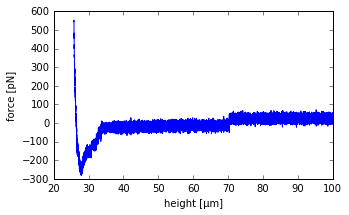
>>> jpk_file = r'path/to/jpk-force/file'
>>> sample = CellHesion(force_file=jpk_file)
>>> import matplotlib.pyplot as plt
>>> x = sample.data.retract.height * 10**6
>>> y = sample.data.retract.force * 10**12
>>> plt.plot(x, y)
>>> plt.xlabel("height [µm]"); plt.ylabel("force [pN]")